Nonoptimal Photography is a collection of custom cameras and their resulting images. Each camera has a unique capture function that subverts a user's expectation of what a camera should record. Each camera is designed to counter a hyper optimized aspect of computational photography.
This post will give an in-depth look at the software development that I completed for this project. You can see more about the hardware development here.
Structure
Using the Raspberry Pi Zero 2 with the Raspberry Pi Camera Module, programming in python was an obvious choice. I tried to abstract as much of the code as possible.
Here is a list of the files and their function:
camera.py- defines the camera controller and camera methods.capture.py- handles how images are captured and processed. Different for each camera.display.py- defines the display controller and methods for image playback.inputs.py- handles the push buttons.leds.py- handles the status leds.push.py- allows a camera to immediately push images to a webserver, used during the exhibition of this project.share.py- controls the web server functionality, allowed the pi to launch a website so a user can download images.main.py- main program flow.
Since each capture algorithm is different for each camera, trying to only change capture.py for each camera was the goal, although I wasn't always able to do that.
Base Camera
To understand how each capture algorithm is different and unique, it might help to have some background on how different aspects of the software work. There is A LOT happening with this code, it was more complex than I expected, so I will focus on main.py and capture.py since these two files contain most of the important logic.
First, main.py does the bulk of the work; imports all the modules, initiates the camera and display components, defines buttons, and handles when different functions are fired.
After handling all the imports, the camera and display modules are initialized.
camera = CameraController()
display = DisplayController()
Next a bunch of helper functions are defined and assigned to button actions
capture_button.when_pressed = handle_capture
preview_button.when_pressed = lambda: set_display_mode("preview")
playback_button.when_pressed = lambda: set_display_mode("playback")
forward_button.when_pressed = lambda: navigate_playback("forward")
back_button.when_pressed = lambda: navigate_playback("back")
share_button.when_pressed = handle_share
up_button.when_pressed = handle_up
down_button.when_pressed = handle_down
The main "display" loop is defined, and started as a thread.
def update_display_loop():
    while True:
        if display_mode == "preview":
            with camera_lock:
                frame = camera.get_frame()
            image = Image.fromarray(frame, 'RGB')
            display.show_image(image)

        elif display_mode == "playback":
            if confirm_delete:
                image = Image.open(DELETE_SCREEN_FILE)
            else:
                image_path = get_current_image()
                if image_path:
                    image = Image.open(image_path)
                else:
                    image = Image.open(NO_IMAGES_FILE)

            display.show_image(image)

        else:
            display.clear()

        time.sleep(0.03)
threading.Thread(target=update_display_loop, daemon=True).start()
When the capture button is pressed on the camera, main.py handles the capture by called the capture_image method from capture.py
def handle_capture():
    global display_mode, previous_display_mode

    if get_display_mode() == "playback":
        set_display_mode(get_previous_display_mode())
    else:
        return_to_display_off = False # track whether you changed the display mode

        # if in off mode, change to preivew, set flag to true
        if display_mode == "off":
            set_display_mode("preview")
            return_to_display_off = True

        #catpure image, this will show the image for three seconds
        capture_image(camera, camera_lock, display)
        get_images()

        #if needed, switch back to the display being off
        if return_to_display_off:
            set_display_mode("off")
For the basic camera, a full resolution image is captured and saved
# in capture.py
def capture_image(camera, camera_lock, display):
    """Capture a full-res image and save to Captures folder."""
    status_led.value = 0.2  # set brightness
    status_led.blink(on_time=0.2, off_time=0.2)

    with camera_lock:
        print("Capturing full-res image...")
        filename = generate_capture_filename(CAMERA_NAME)
        save_path = CAPTURES_DIR / filename

        try:
            # Get image from camera
            array = camera.capture_image_array()
            image = Image.fromarray(array)
            image.save(save_path)

            if save_path.stat().st_size == 0:
                print("zero byte")
                save_path.unlink(missing_ok=True)
                status_led.off()
                return None


            prine(f"Saved: {save_path}")
            # display whatever was saved...
            flash_capture = Image.open(save_path)
            display.show_image(flash_capture)
            time.sleep(2)

        except Exception as e:
            print(f"Capture failed: {e}")
            satus_led.off()
            return None

        status_led.off()
You will see how that function changes for each camera.
no01 - Mean Color

The first Nonoptimal Camera is the Mean Camera. Building off of earlier experiments in color averaging and single pixel camera, this camera reduces a full resolution image to a single color by averaging the color of every pixel. No full resolution images remain on the camera, only images like this, a single field of color.

My first experiments relied on simply averaging the red, green, and blue values that make up pixel, but this often led to boring, mid tone greys. After doing some research I realized that using Hue, Saturation, and Value (HSV) for the color space allows for a more accurate average, but the math is more difficult, damn trigonometry, but NumPy makes this trivial.
Here is the code snippet from no01/capture.py showing the pertinent averaging code:
small = np.array(Image.fromarray(frame_fullres).resize((160, 90)))

# convert to hsv and compute average
normed = small.astype(np.float32) / 255.0
h, s, v = rgb_to_hsv_np(normed)
print("converted to hsv")

h = h * 2 * np.pi # maps hue to an angle
print("unpacked hsv")

#average hue as unit vectors
x = np.cos(h)
y = np.sin(h)
avg_hue = np.arctan2(np.mean(y), np.mean(x)) / (2 * np.pi)
avg_hue = avg_hue % 1.0
print("average the hue")

#Average saturation and value
avg_sat = np.mean(s)
avg_val = np.mean(v)
print("average the sat and val")

#Convert back to RGB
# r, g, b = colorsys.hsv_to_rgb(avg_hue, avg_sat, avg_val)
# r, g, b = int(r * 255), int(g * 255), int(b * 255)
r, g, b = hsv_to_rgb_scalar(avg_hue, avg_sat, avg_val)
print("convert back to rgb")
no02 - The Compressor
This camera, like the name suggests, adds high amounts of jpeg compression after images are captured. This results in visible compression artifacts and shifts in color. Only the compressed images are saved.

Here you can see how the compression affects the quality of the image.

The code for this is quite simple, a full resolution image is captured, but when it is saved a very high amount of compression is applied by lowering the jpeg quality. This is at a 1 to 100 scale, so the 1-5 amount chosen at random is guaranteed to really blow out the image.
## Get random JPEG quality
jpeg_quality = random.randint(1, 5)
print(f"JPEG Quality selected: {jpeg_quality}")

image = Image.fromarray(array)
image.save(save_path, format="JPEG", quality=jpeg_quality)
no03 - Downscale/Upscale
This camera is another exploration of image quality, this time focusing on the number of pixels captured.

The images are captured at full resolution, then immediately downsampled to 6 by 4 pixels with the nearest neighbor algorithm then upscaled back to full resolution using the bicubic algorithm.

image = Image.fromarray(array)

downscaled = image.resize((6, 4), Image.NEAREST) #1.5 ratio
upscaled = downscaled.resize(UPSCALED_SIZE, resample=Image.BICUBIC)

upscaled.save(save_path)
print(f"Low-res upscaled saved to {save_path}")

if save_path.stat().st_size == 0:
  print("zero byte")
  save_path.unlink(missing_ok=True)
  status_led.off()
  return None
There were many options for the downscaling and upscaling algorithms, the two chosen were the most aesthetically pleasing to me.
To illustrate this, here is a full res image before scaling.

And here are all the different permutations of scaling algorithms applied to the same image.

More on image scaling algorithms for the curious.
So far these first three cameras have all altered a full resolution image. In each case, only the altered image is saved, the full resolution image is discarded immediately. The rest of the cameras act differently, they don't alter an image post capture but change how an image is captured in the first place.
no04 - The Shake
Many algorithms have been developed to stabilize image capture so images are more clear, this camera is the exact opposite, a camera must be vigorously shaken to activate the shutter button.

This makes it so the camera can never capture a clear image, the movement of the camera is captured instead.

capture.py is unchanged from the original base camera. Instead, the capture code is only allowed if at least one of two vibration switches added to the camera are closed while the shutter button is pressed.
# In main.py
# shake handler
def handle_shake():
    global shake_active, shake_timer
    shake_active = True

    print("shake")

    status_led.on() #indicates a shake to the user
    if shake_timer:
        shake_timer.cancel() #this cancels a shake_timer if one is already running
    shake_timer = Timer(shake_window, reset_shake) #shakes are fleeting, this makes them linger some
    shake_timer.start() #start the shake timer

    global led_timer
    if led_timer:
        led_timer.cancel() #this cancels a led timer if one is already running
    # led_timer = Timer(led_timeout, turn_off_led)
    led_timer = Timer(led_timeout, lambda: (status_led.off())) #setup a new timer, kill the light when done
    led_timer.start() #start the led timer

def reset_shake(): #gets called when shake_timer expires
    global shake_active
    shake_active = False

# capture handler, checks if shake_active is true
def handle_capture():
    global display_mode, previous_display_mode, button_ready #no04 necessary

    if get_display_mode() == "playback":
        set_display_mode(get_previous_display_mode())
    else:
        if button_ready and shake_active:
            # no04 triggers when shaked and button pressed
            button_ready = False

            return_to_display_off = False # track whether you changed the display mode

            # if in off mode, change to preivew, set flag to true
            if display_mode == "off":
                set_display_mode("preview")
                return_to_display_off = True

            #catpure image, this will show the image for three seconds
            capture_image(camera, camera_lock, display)
            get_images()
no05 - Ghosting
A common computational photography algorithm is High Dynamic Range (HDR), where multiple images are captured at the same time then combined into an optimized capture. This camera takes that to the extreme, capturing every frame between presses of the shutter button.

This creates an extreme multiple exposure effect that results in interesting images.

Code wise, this was the most complex camera and also the most processing intensive one. The algorithm is conceptually related to color averaging of no01 - Mean Color, but each pixel is color averaged with the pixel before it, and the averaged pixels are stored at the next shutter button press.
The file average.py handles the bulk of the computation.
import numpy as np

def initialize_composite_state(h, w):
    return {
        "hue_x":  np.zeros((h, w), dtype=np.float32),
        "hue_y":  np.zeros((h, w), dtype=np.float32),
        "sat":    np.zeros((h, w), dtype=np.float32),
        "bri":    np.zeros((h, w), dtype=np.float32),
        "weight": np.zeros((h, w), dtype=np.float32),
    }

def rgb_to_hsv_np(frame):
    """frame: H×W×3 float32 in [0,1]. Returns h,s,v each H×W in [0,1]."""
    r, g, b = frame[...,0], frame[...,1], frame[...,2]
    mx = np.maximum(np.maximum(r, g), b)
    mn = np.minimum(np.minimum(r, g), b)
    d  = mx - mn

    # Hue
    h = np.zeros_like(mx)
    mask = d > 1e-6
    # red max
    idx = mask & (mx == r)
    h[idx] = ((g[idx] - b[idx]) / d[idx]) % 6
    # green max
    idx = mask & (mx == g)
    h[idx] = ((b[idx] - r[idx]) / d[idx]) + 2
    # blue max
    idx = mask & (mx == b)
    h[idx] = ((r[idx] - g[idx]) / d[idx]) + 4
    h /= 6.0

    # Saturation
    s = np.zeros_like(mx)
    s[mask] = d[mask] / mx[mask]

    # Value
    v = mx
    return h, s, v

def update_composite_state(composite, rgb_frame, decay=0.995):
    f = rgb_frame.astype(np.float32) / 255.0
    h, s, v = rgb_to_hsv_np(f)
    w = v  # brightness as weight

    ang = h * 2 * np.pi
    composite["hue_x"]  = decay * composite["hue_x"] + np.cos(ang) * w
    composite["hue_y"]  = decay * composite["hue_y"] + np.sin(ang) * w
    composite["sat"]    = decay * composite["sat"]   + s * w
    composite["bri"]    = decay * composite["bri"]   + v * w
    composite["weight"] = decay * composite["weight"] + w

def composite_to_image(composite):
    h = np.arctan2(composite["hue_y"], composite["hue_x"]) / (2*np.pi)
    h %= 1.0

    w = composite["weight"] + 1e-6
    s = np.clip(composite["sat"] / w, 0, 1)
    v = np.clip(composite["bri"] / w, 0, 1)

    return hsv_to_rgb_np(h, s, v)

def hsv_to_rgb_np(h, s, v):
    i = (h*6).astype(int) % 6
    f = (h*6) - i
    p = v * (1 - s)
    q = v * (1 - f*s)
    t = v * (1 - (1-f)*s)

    r = np.select([i==0, i==1, i==2, i==3, i==4, i==5],
                  [v, q, p, p, t, v])
    g = np.select([i==0, i==1, i==2, i==3, i==4, i==5],
                  [t, v, v, q, p, p])
    b = np.select([i==0, i==1, i==2, i==3, i==4, i==5],
                  [p, p, t, v, v, q])

    return (np.dstack([r, g, b]) * 255).astype(np.uint8)
main.py imports some functions from this file and calls them in the capture handler.
def handle_capture():
    global composite
    if get_display_mode() == "playback":
        set_display_mode(get_previous_display_mode())
    else:
        # capture_image(camera, camera_lock)
        image = Image.fromarray(composite_to_image(composite), 'RGB')
        save_composite(image, camera_lock)
        composite = initialize_composite_state(height, width)
        get_images()
To me this is the most fun camera to use and results in the most interesting images.
no06 - Off-kilter
Many digital cameras have line indicators to help users position the camera perfectly parallel to the horizon, ensuring images are aligned. Off-kilter has been described as an architect's nightmare because it only allows images to be captured when the camera is not parallel to the horizon.

Two tilt ball switches have been added to the camera, the switch is closed when gravity pulls a small metal ball to touch two contacts. The sensors are positioned so that they are only closed when the camera is rotated between about 15 degrees to 80 degrees counter clockwise from normal position.
In main.py a capture is only allowed when both switches are closed, meaning the camera is not positioned parallel to horizon either horizontally or vertically.
# adding two more inputs
tilt_1 = Button(17, pull_up=True)
tilt_2 = Button(27, pull_up=True)

# later...

# check if the switches are closed
def handle_tilt():
    global tilted
    # if both sensors are tilted,
        # change tilted to true
        # turn status led to on
    if tilt_1.is_pressed and tilt_2.is_pressed:
        tilted = True;
        status_led.on()
    else:
        tilted = False;
        status_led.off()

# capture only allowed when tilted is true
def handle_capture():
    global tilted, display_mode, previous_display_mode

    if get_display_mode() == "playback":
        set_display_mode(get_previous_display_mode())
    else:
        # test to see the status of tilt here
        if tilted == True:
            print("tilted!")
            return_to_display_off = False # track whether you changed the display mode
            # if in off mode, change to preivew, set flag to true
            if display_mode == "off":
                set_display_mode("preview")
                return_to_display_off = True

            #catpure image, this will show the image for three seconds
            capture_image(camera, camera_lock, display)
            get_images()
So all the images are captured at skewed angles.

no07 - Memory Loss
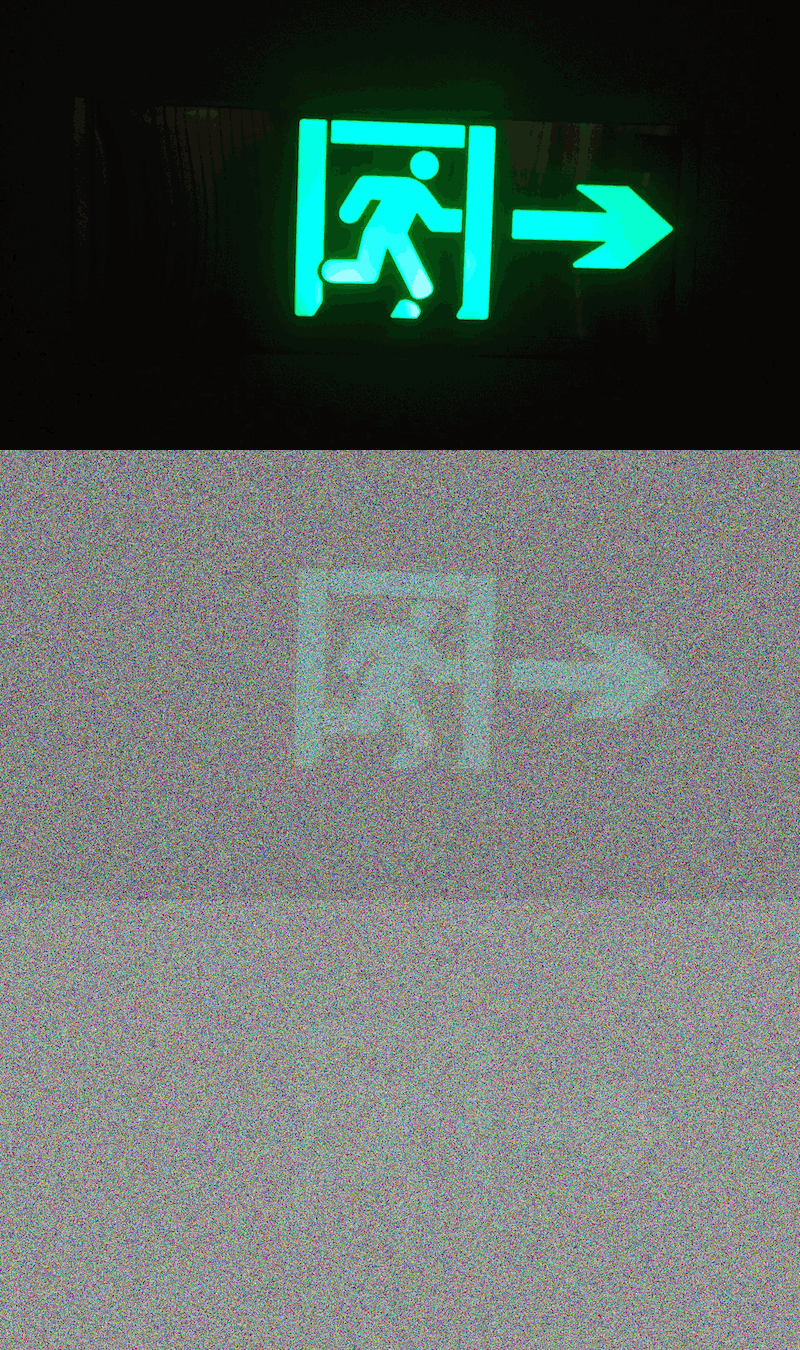
The final camera in the current set is Memory Loss, and is a conceptual outlier to the other cameras. It takes straight, meaning unaltered, images. But if an image is not frequently viewed on the camera, it will degrade into pure noise.

This is done with a dedicated python script, degrader.py running in parallel to the camera code.
import os
import time
import random
import threading
from PIL import Image
import numpy as np
import tempfile

class Degrader:
    def __init__(self, directory: str,
                 image_timestamps: dict,
                 time_limit: float = 10.0,
                 pixels_per_drop: int = 1000,
                 interval: float = 1.0):
        self.dir = directory
        self.timestamps = image_timestamps
        self.time_limit = time_limit
        self.pixels_per_drop = pixels_per_drop
        self.interval = interval
        self._thread = None
        self._stop = threading.Event()

    def _drop_pixels(self, filepath: str):
        try:
            with Image.open(filepath) as im:
                px = im.load()
                for _ in range(self.pixels_per_drop):
                    x = random.randrange(im.width)
                    y = random.randrange(im.height)
                    px[x, y] = (
                        random.randrange(256),
                        random.randrange(256),
                        random.randrange(256)
                    )
                im.save(filepath)
        except Exception as e:
            print(f"[degrader] Failed to degrade {filepath}: {e}")

    def _degrade_loop(self):
        max_time = 200       # seconds to reach full degradation
        max_stddev = 255      # max noise stddev

        while not self._stop.is_set():
            now = time.time()
            for name, last_seen in list(self.timestamps.items()):
                path = os.path.join(self.dir, name)

                if not os.path.isfile(path):
                    self.timestamps.pop(name, None)
                    continue

                elapsed = now - last_seen
                if elapsed >= self.time_limit:
                    scale = min((elapsed / max_time) ** 2, 1.0)
                    stddev = scale * max_stddev

                    self._add_gaussian_noise(path, stddev)
                    # bump timestamp forward
                    self.timestamps[name] = last_seen + self.time_limit

            time.sleep(self.interval)

    def start(self):
        if self._thread is None:
            self._thread = threading.Thread(
                target=self._degrade_loop,
                daemon=True
            )
            self._thread.start()

    def stop(self):
        self._stop.set()
        if self._thread:
            self._thread.join()

    def _add_gaussian_noise(self, filepath: str, stddev: float):
        try:
            im = Image.open(filepath).convert("RGB")
            arr = np.array(im).astype(np.int16)
            noise = np.random.normal(0, stddev, arr.shape)
            arr = np.clip(arr + noise, 0, 255).astype(np.uint8)

            # save to temp file in same dir, then overwrite original
            # tmp_path = filepath + ".tmp"
            base, _ = os.path.splitext(filepath)
            tmp_path = base + ".tmp"

            # Image.fromarray(arr).save(tmp_path)
            Image.fromarray(arr).save(tmp_path, format="JPEG")
            os.replace(tmp_path, filepath)  # atomic move
            print(f"[degrader] added noise to {os.path.basename(filepath)} with stddev={stddev:.2f}")
        except Exception as e:
            print(f"[degrader] Failed to add noise to {filepath}: {e}")
Currently the degrading happens at quick intervals, every 10 seconds, so images will become pure noise after a few minutes. This was for demonstration purposes and could be changed later.
Resources
The full code can be viewed in this repository. Switch to different branches to see how the camera code is unique for each one.